Under the Hood - StealNui a new linux RAT clipper
StealNui, a new Linux RAT that communicates through Discord and includes a multi-crypto clipper… which was never configured.

A short while ago, during a hunting session, we came across a rather unusual piece of Linux malware: an implant packed with features, but also capable of checking its execution environment, which is fairly rare in the Linux world!
TL;DR: This is a C++ implant with a complete surveillance toolkit, ranging from a keylogger to a reverse shell. It also contains a multi-cryptocurrency clipper whose replacement addresses were… never configured.
Technical Analysis
1. Overview
This binary, detected only once on VirusTotal, makes far too much noise on Exalyze 4dd8231da39c9da39ae61890bfdb48ff155616b2c86051570ea24c578594d6b7 to be honest, so let’s dig into it a little to understand what lies beneath.
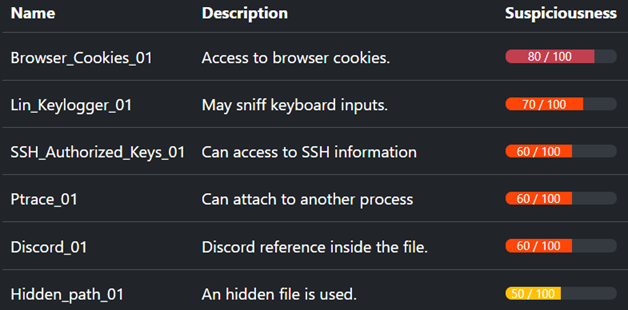
First of all, the binary does not appear to implement any encryption. Several highly sensitive strings are directly visible, including references to virtualization paths, Discord addresses, and SQL queries. In addition, we can observe various references to SSH keys, the ptrace library, and methods for finding the public IP address of the machine on which it is running.
Even more elements to fuel our curiosity!
2. Anti-analysis: a standard checklist… and a surprisingly complete defensive-reconnaissance module
When executed, the malware uses numerous methods to determine whether its execution context is being monitored. These include:
CPUINFO, to determine whether it is running on a virtual CPU- Reading
/sys/class/dmi/id/*_vendorto identify whether it is running under a hypervisor - Reading
/proc/modulesto look forhv_vmbus,vmw_vmci, and similar modules - Checking hypervisor support files such as
/usr/bin/vmtoolsdor/usr/sbin/VBoxService - Checking the MAC address in use, particularly whether it starts with a VM-related prefix
The malware then moves on to a second stage of checks. So far, it was attempting to determine whether it was virtualized; now, it becomes more specific about its intentions.
For example, it checks whether the hostname or username contains values such as virus, sandbox, or remnux. It then lists the running processes in search of ghidra, strace, tcpdump, and similar tools. Finally, it checks whether it is being debugged by calling ptrace(PTRACE_TRACEME...).
This series of checks is relatively uncommon in the Linux world. It already allows us to infer several things: the developer is looking for multiple ways to determine whether the implant is being observed, is specifically targeting systems associated with malware analysis, but did not attempt to conceal its strings, which are fairly explicit.
3. Multiple persistence mechanisms
First, a mutex is created upon infection. It is located at /tmp/.systemd-jrnl.lock and is used to determine whether the machine has already been compromised. The malware then copies itself to ~/.config/systemd-runtime/systemd-journald-helper, which becomes the binary used for subsequent executions.
Five persistence methods are present:
- In the crontab, but only if at least one CRON job already exists. The inserted entry relaunches the program every five minutes.
- In the user’s systemd configuration, specifically
~/.config/systemd/user/systemd-journal-helper-service - In the Cross-Desktop Group (XDG) autostart, which is specific to graphical environments on Linux. This indicates that the malware is indeed targeting end users.
- In
.bashrc, using a slightly different command because it runs in an interactive shell:(pgrep -f <FILE> >/dev/null 2>&1 || nohup <FILE> >/dev/null 2>&1 &) - In
.profile, once again using the same command
It is fair to say that the developer really wants to remain on the machine. This diversity is probably intended to ensure persistence if one of the mechanisms is cleaned up. However, it is somewhat surprising that only a single execution path is not used.
4. Communication with the C2
The C2 infrastructure is rather unusual: a Discord server, used through an API that is now deprecated, to communicate with the victim. You have to keep up with the times… I miss IRC…
During the first connection, the malware performs host reconnaissance, the !recon command discussed below. It collects:
- The hostname
- The current user, including contextual information such as their shell and whether they are root
- The machine configuration, including the operating system, architecture, kernel, RAM, and so on
- The available network interfaces
- The DNS configuration
- The machine’s public IP address
- The security controls in place, ranging from auditd to various antivirus, EDR, and commercial security-checking tools
- The list of running processes
- Interesting installed packages, such as SSH, VNC, Apache, Docker, and so on
- Sudo-enabled users
- SSH keys
This provides a very comprehensive overview. With this information, an attacker can build an action plan and prepare a strategy for further compromise or deeper implantation.
Every three seconds, the malware polls the Discord server and retrieves the five latest messages using libcurl. The result is passed to a C++ dispatcher that provides a fairly complete set of commands:
| Command | Action |
|---|---|
!recon |
Performs the reconnaissance described above |
!passwords |
Extracts passwords stored in the browser |
!roblox |
Retrieves Roblox cookies |
!tokens |
Retrieves Discord tokens from the machine |
!exec <cmd> |
Executes an arbitrary command |
!download <path> |
Exfiltrates a local file |
!upload <url> <dest> |
Downloads an arbitrary file via curl |
!screenshot |
Takes a screenshot of the desktop |
!screenshotw |
Takes a screenshot of the active window |
!clipjack start/stop |
Hijacks the clipboard through xclip |
!keylog start/stop/dump |
Manages the keylogging thread |
!revshell <ip> <port> |
Creates a reverse shell |
!persist / !selfdestruct |
Installs persistence mechanisms / self-destructs |
!help |
Lists the available commands |
The attacker can therefore interact with the bot as if it were a regular Discord channel, except that the other participant is a victim.
The webhook used is: hxxps://discordapp.com/api/webhooks/1512097381083254906/BbfgyvvpZFj1jbRIxYk7Yx24QO21iK_ZTcw3vxRb6IVhw0UAiNbc9lleSpRGHVnxgqwg, the Discord channel is 1510585473326776342, and the bot token is: MTUxMDU4NDk1MzQwNTA0NjgzNA.GRXem9.Jml6Wi5iC8kWfMOtWk0ZMwqkmafIwu4kJovvX4
5. The keylogger
Two keylogging methods are implemented, maximizing the chances of capturing the victim’s keystrokes.
First, the malware checks whether it can access /dev/input/event0 to determine whether it has permission to access the keyboards. If the device is accessible, it simply reads the input events. Otherwise, it falls back to X11, as described below.
In the first case, it attempts to identify the available keyboards supporting EV_KEY, checks that the device is actually a keyboard, and retrieves its key mapping. The first detected keyboard is used. The binary then captures keystrokes and even handles SHIFT for uppercase characters. It stores the keystrokes together with the title of the active window, allowing the attacker to determine not only what was typed, but also where it was typed.
In the second case, when /dev/input/event0 is not accessible, the malware falls back to X11 by launching xinput test-xi2 --root, and then behaves similarly to the method described in the previous paragraph.
6. The clipper
This part is what made me want to share the malware, and it turned out to be rather surprising.
While digging into the clipboard-hijacking function executed at the beginning of the program, we found that it checks the clipboard every 0.5 seconds. The input is obtained through:
xclip -selection clipboard -o 2>/dev/null || xsel -ob 2>/dev/null
Once the data has been retrieved, several regular expressions are applied to identify which cryptocurrency address should be replaced:
^bc1[a-zA-HJ-NP-Z0-9]{25,39}$-> BTC (bech32)^[13][a-km-zA-HJ-NP-Z1-9]{25,34}$-> BTC (legacy P2PKH/P2SH)^0x[0-9a-fA-F]{40}$-> ETH^[1-9A-HJ-NP-Za-km-z]{32,44}$-> Solana (base58)^ltc1[a-zA-HJ-NP-Z0-9]{25,39}$-> LTC (bech32)^[LM][a-km-zA-HJ-NP-Z1-9]{25,34}$-> LTC (legacy)^4[0-9AB][1-9A-HJ-NP-Za-km-z]{93}$-> Monero
Each regular expression is associated with a replacement address. However, in this sample, the strings are literally the placeholders YOURBTCADDRESS, 0xYOURETHADDRESS, YOURSOLANAADDRESS, ltc1qYOURLTCADDRESS, and YOURMONEROADDRESS.
They were never replaced with a real attacker-controlled address.
Was this an oversight, or simply a test sample?
The malware then clears the clipboard and injects the new address into both clipboard selections: echo -n '<text>' | xclip -selection clipboard 2>/dev/null and echo -n '<text>' | xclip -selection primary 2>/dev/null
7. CTI section
There is relatively little literature on Linux clippers. The main example we can mention is ClipXDaemon, which shares several similarities with the code analyzed here:
- Similar persistence locations, although with different names
- Similar targeted cryptocurrencies
It is possible that this version was inspired by that malware. Since it was first submitted to VirusTotal on June 4, 2026, under the infection name associated with the sample, we can hypothesize that the submission may have originated from a victim.
We were unable to identify any direct link with other malware codebases sharing code or code fragments with this binary. We therefore believe this is new code, potentially still under development or testing, although one of the elements described above suggests that it may already have been used.
8. Detection
Several elements can help detect this malware. First, the various filenames listed as IOCs in Section 9, as well as the persistence locations discussed above, particularly .bashrc and .profile.
More generally, regularly reviewing these locations can reveal poorly concealed implants.
And, by the way, identifying malware on information systems is part of our daily work at ExaTrack ;) This binary is only one internal signature among hundreds of emerging malware families that we have already identified and signed!
9. IOCs
| Files |
|---|
/tmp/.systemd-jrnl.lock |
~/.config/systemd/user/systemd-journal-helper-service |
~/.config/autostart/systemd-journal-helper.desktop |
systemd-journald-helper |
| SHA256 |
|---|
| 4dd8231da39c9da39ae61890bfdb48ff155616b2c86051570ea24c578594d6b7 |
Yara rule detecting StealNui:
rule StealNui {
  meta:
      description = "Linux RAT and clipper"
      sha256      = "4dd8231da39c9da39ae61890bfdb48ff155616b2c86051570ea24c578594d6b7"
      date        = "2026-08-06"
      author      = "Heurs"
  strings:
      $pattern_1 = "/tmp/.systemd-jrnl.lock"
      $pattern_2 = "--- Sudoers check ---"
      $pattern_3 = "_\\|WARNING:[^|]+\\|_[A-Za-z0-9%+/=_-]{100,}"
      $pattern_4 = "xinput test-xi2 --root 2>/dev/null"
  condition:
      uint32(0)==0x464c457f and (2 of ($pattern_*))
}